Saturday, 28 December 2013

SAP TRANSPORTS HANG HOW TO TROUBLESHOOT THIS PROBLEM

SAP transport hang. Transport Troubleshooting guide

1. Basic transport troubleshooting. Verify that there are no errors in system log.
        Execute transaction STMS
        Select Import Overview
        Select SID
        From menu > Go To > System Log
        Correct if no issues in log.
KNOWN ISSUES :
1. Known Issue 1 - WARNING: \\SERVER\sapmnt\SIDtrans\tmp\SID.LOB is already in use
(22720), I'm waiting 2 sec (20100322091720). My name: pid 10128 on
SERVER (SIDadm)
 Solution 1 - Backup and delete the file '\\SERVER\sapmnt\SIDtrans\tmp\SID.LOB'. Add the transport again and perform import.

2. Known issue 2 - Cannot find \\SERVER\sapmnt\SIDtrans\log\SLOGXX02.SID
Solution 2 - Make sure that file exists. If not, copy the most recent SLOG (example SLOGXX01) and rename it to SLOGXX02.SID. Check again the system log if the issue persist.

3. Known issue 3 - Problems with job RDDIMPDP
 Solution 3 - Execute SE38 > Run program RDDNEWPP > Choose Normal priority. This will schedule new RDDIMPDP job that is responsible for pushing transport requests in your system.

Disclaimer: The next steps are steps to clear the transport list to make sure that transports push successfully. This should be aligned with customer.

2. Clear the transport list and redo the transport
       Execute transaction STMS
       Import overview -> Goto -> Import monitor >
     'Monitor' -> right click on transport -> delete entry
      Redo the transport action. Proceed to next step if not solved.

3. Clear the transport tables
   Make sure that there are no stuck transports in your transport tables.
   Check and delete entries (using transaction SM30) any entries found in the following tables:
      TPSTAT
      TRJOB
      TRBAT
 To do this execute SM30
 Enter 'TRBAT' in Table/View.
 Click on Display
Verify that NO transport number or HEADER exists.
 If the Import Monitor or table TPSTAT does not contain
 entries any more, you can delete the entries of tables TMSTLOCKR andTMSTLOCKP.
 Redo the transport action.
If this does not solve the problem. You have the option to stop all transport from OS level.

4. Kill tp.exe OS process
 Login to SAP server
 Kill any TP.exe processes at the OS level.
 Try again to add and import your request
 Redo the transport action
5. Save transport resources.
 It is SAP's recommendation that imports be done asynchrounously rather than synchronously. By doing this you will be conserving system Resources.
 In doing the import > Execution tab > Select 'Asynchrounously' > Confirm import

6. Make sure that transport parameters are okay.
    Add the following parameter to your transport profile.
   '/system_pf=/usr/sap//SYS/profile/DEFAULT.PFL'
This parameter simply tells sapevt where to look for your DEFAULT.PFL. Check note 449270 for further information on this. Ensure you have the other settings like:
rdisp/mshost =
rdisp/msserv = sapms
SAPSYSTEM = 00 (this is the system number)
Add system_pf paramter to transport tool via STMS. On the left have
system_pf and on the right /usr/sap//SYS/profile/DEFAULT.PFL
After this, restart the system so that the new parameter is taken into account by the system.


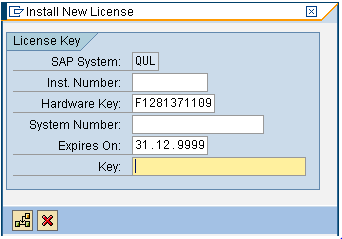
HOW TO APPLY SAP LICENSE

To Activate the License.

  1. Use the Transaction code -> slicense
  2. Click the Determine button


  1. Click  Determn


This is will generate the Hardware key send the same to sap & get the key
Once you get the Key

  1. Click Install


  1. Fill the detail which you get from SAP


  1. Click the
                               to install the license.


Friday, 27 December 2013

Troubleshooting long running transport

Troubleshooting long running transport
This article answers the following queries :
     How to troubleshoot when a transport is running for unusually long duration and not getting completed or terminated ?

     1.How to troubleshoot when a transport is in truck status for a long duration of time ?
   2. How to cancel a transport request which is in truck status or running status ?
     3. How to terminate a long running transport request to re-import again ?
     4. Transport is not getting terminated. How to do terminate?
     5.How to troubleshoot when a transport is running for unusually long duration and not getting   completed or terminated ?

Go to transaction STMS_IMPORT and identify the transport which is running since a long duration.


Issue could be due to following reasons :


1)    Non availability of space to perform the operation (i.e filesystem or tablespace is 100% full)
Solution :
   * Check out if any of the filesystems (like sapmnt, oraarch etc) of the Central Instance, Database and  application servers  is 100% full. If so, please add necessary space, which resolves the issue automatically and completes the import of transport.
    * Also, check out tablespaces fill levels. If autoextend is off and tablespace is 100% full then add sufficient datafiles, which resolves the issue
2)   RD* jobs are not running in SAP system
Solution :
Check out in SM37 whether RDD* jobs(RDDIMPDP, RDDIC3L, RDDVERSL etc) are running or not. If not, please make sure they are scheduled and perform the import of the transport again to schedule RDDIMPDP job  goto  se38 and run the report  RDDNEWPP
3)   Update got deactivated
Solution :
Checkout in SM13 whether update is active or not. If it is not active, activate it and import the Transported to Production System
4)   There are no free background workprocesses
Solution :
Check in SM50 whether all background workprocesses are in running status. If so, you will need to wait for the free background workprocess to run RDD* jobs to complete the  import of the transport. To avoid this issue in future you may increase the number of background workprocesses
5)Transport is not getting terminated. How to do terminate?
1) If you are unable to terminate a transport which is running, goto SM50 and identify the pid of the transport process. Try to cancel the process with core or without core as shown below
2) If it is not getting terminated from SAP level, then goto Oslevel and kill
Command for the same in AIX or HP-UX is  kill -9 <PID> 
If it is not getting killed from oslevel also, try to search for processes related to tp or R3trans and kill them as well
Eg  in AIX or HP-UX :    ps –ef |grep tp
                                                 Or

                                             ps –ef |grep r3trans
3) If it is not getting terminated from that level, you may try to kill as shown below at SAP level :

Goto  Import monitor and

Navigate as below and right click and delete entry to delete the transport which is being imported
By any one of the above 3 methods, transport will surely get terminated. So then you can add to queue again and re-import


Thursday, 26 December 2013

ROLES AND RESPONESIBILITIES OF BASIS PEOPLE IN SAP IMPLEMENTAION

ROLES AND RESPONESIBILITIES OF BASIS PEOPLE IN SAP IMPLEMENTAION

Implementation is an activity to deploy any new software
component into an organization. Installation, configuration,
security, adoption, customizing and development, transportation,
training and GO –LIVE.
1. Designed server architecture and performed sizing to define
hardware required for the customer.
2. Involved in designing in DR/standby site planning, design,
deployment and execution (DB).
3. Defined and designed various clients like Golden Client, Test
Client based on customer implementation strategy.
4. Configuring extended client transport and transport
mechanism.
5. Installation of development server (DEV) with central system
architecture and Quality server (QAS) with distributed
architecture and high availability on production System
(PRD).
6. Installed various versions of SAP components like ERP, SRM,
SCM, PLM, CRM etc..,
7. Installed SAP GUI and configured logon groups etc..,
 Applied patches and maintained versions for SAP applications.
8. Performed SAP Kernel upgrade.
9. Designing policies for Notes Application and Package
Implementation.
10 .Worked with security and network team ensuring installation
and connectivity of SAP frontend for remote site users.
11. Delta upgrade for PI-Basis component on BW server
installation of BI cont component through SAINT.
12. Configuration of SAP Help library through SR13.
13. Knowledge of designing and implementing disaster recovery
solution by means of transaction log shipping SQL specific.
14. Performed post installation activities specific to ERP
component.
15. Setup transport management system along with Virtual
Systems, Layers, Routes, etc..,
16. Defined three system landscape and established
communication between them Deployed SAP Notes based on requirement from functional teams.
17.Defined system settings and client settings based on the
system and client roles.
18. Worked with hardware venders to finalize the hardware team
to finalize the hardware.
19. Installed additional languages based on requirements.
20. Worked with SAP team to finalize the software required for
the customer.
21. Enabled the web functionality for SAP ERP system (Internet
communication framework).
22. Worked with installation and startup issues of SAP ERP
system.
23. Configured profile parameters for default and instance
profiles.
24. Had extensive knowledge on client copy strategies, client
comparison and adjustment.
25. Worked with Trans directory to transport the requests and
analyze the issues of transportation.Transported the objects in the landscape                              as per the system definitions in STMS.
26. Worked with End users to configure printers, GUI and other
issues.
27. Prepared a process documentation and end user
documentation for training End users.
28. Prepared a handover checklist to get the sign from the users
in the Basis prospective.
29. Configured backup, performed backup and tested for its
consistency.
30. Communicated with SAP to connect GO-LIVE sessions.
31. Configured the recommended parameters as per GO-LIVE
report.
32. Defined a schedule to parallel run to move data from legacy
systems to SAP systems.
33. Worked with client specific, cross client customizing requests.
34. Participated in multi-landscape design solution, architecture
recommendation and strategies for continuous
improvement.